How to Use AI to Write LinkedIn Posts That Build Your Business in 2026
The practical guide to using AI writing tools to maintain a consistent LinkedIn presence without spending hours every week writing posts from scratch
This article contains affiliate links. If you purchase through these links, we may earn a commission at no extra cost to you. This does not affect our assessment — we only recommend tools we genuinely believe deliver value.
How to use AI to write LinkedIn posts is one of the most searched business writing topics in 2026 — and for good reason. LinkedIn has become the primary business development channel for professional services firms, consultants, freelancers, and small businesses that sell to other businesses. A consistent LinkedIn presence — posting regularly about your expertise, your client results, and your perspective on your industry — generates awareness, builds credibility, and produces inbound enquiries that are significantly warmer than any cold outreach. The problem for most business owners is that posting consistently requires time they do not have, which means most LinkedIn strategies fail not from lack of intention but from lack of execution.
The honest context is that AI writing tools are a production accelerator for LinkedIn content rather than a replacement for genuine expertise and authentic voice. The insight, the professional perspective, and the specific experiences that make LinkedIn posts worth reading still come from you. What AI tools eliminate is the blank page friction — the time spent translating a thought or experience into a well-structured, appropriately formatted LinkedIn post. Used correctly, AI tools allow you to produce a week’s worth of LinkedIn posts in under twenty minutes, which makes consistent posting achievable alongside a full working week. See our guide on how to use AI to write social media posts for the broader picture of how AI tools work across different social platforms.
Why LinkedIn Matters More Than Most Business Owners Realise
LinkedIn’s algorithm rewards consistency above almost everything else. A business owner who posts three times per week for six months builds a significantly larger and more engaged audience than one who posts twenty times in one month and then disappears. The compounding effect of consistent posting — where each post reaches a slightly larger audience than the last, and where the audience becomes more engaged over time — is what produces the inbound enquiries and opportunities that make LinkedIn worth the effort.
The businesses that generate the most commercial value from LinkedIn are those that have cracked the consistency problem — and AI writing tools are how most of them have done it. Producing three posts per week manually, week after week, is mentally demanding in a way that most business owners underestimate. Producing three posts per week with AI assistance is a twenty-minute weekly task that almost anyone can maintain indefinitely. For the broader picture of AI tools for business development, see our guide to the best AI tools for small business marketing.
The Best AI Tool for Writing LinkedIn Posts
Rytr is the strongest AI writing tool for LinkedIn post production. The dedicated LinkedIn post template produces well-structured posts in the format that LinkedIn’s algorithm rewards — a strong opening line, a clear point or insight, supporting detail or evidence, and a call to engage. The output captures a professional tone without sounding corporate, and generates multiple variations so you can choose the approach that best matches your voice. At six pounds per month for the Saver plan — with a free plan offering ten thousand characters per month — Rytr is accessible to any professional who wants to build a LinkedIn presence without a social media manager. See our full Rytr review for the complete breakdown of what Rytr can produce beyond LinkedIn posts.
For professionals who want to use their LinkedIn content as part of a broader content strategy — writing blog posts or articles that their LinkedIn posts link to, creating a content flywheel where long-form content and social posts support each other — Koala AI is the strongest complement to Rytr. Koala AI produces the long-form articles that give your LinkedIn posts depth and credibility, while Rytr produces the posts themselves. See our full Koala AI review for the complete assessment of how Koala AI fits into a content-led business development strategy.
How to Use Rytr to Write LinkedIn Posts Step by Step
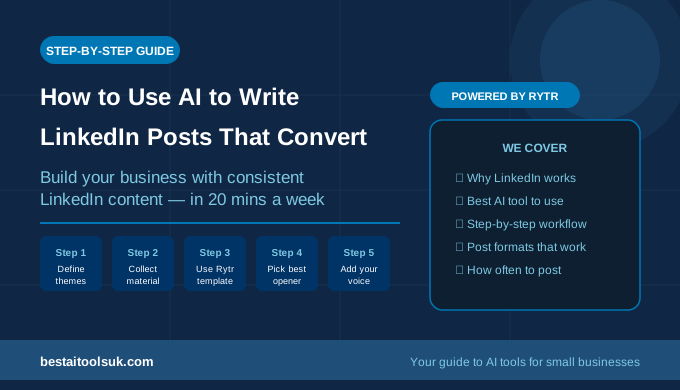
Step 1 — Identify Your Weekly Content Themes
Before producing any AI-assisted LinkedIn posts, decide on three to five content themes that reflect your expertise and appeal to your target clients. These themes should be specific enough to generate regular posts but broad enough that you do not run out of ideas. For a financial adviser, themes might be retirement planning, tax efficiency, common financial mistakes, and client success stories. For a marketing agency, themes might be content strategy, SEO, client results, and industry commentary.
Having defined themes removes the hardest part of LinkedIn content creation — deciding what to write about — and turns AI-assisted production into a simple filling-in exercise each week.
Step 2 — Collect Raw Material During the Week
The best LinkedIn posts are grounded in real observations, experiences, and insights from your working week. Keep a running note on your phone of anything that strikes you as worth sharing — a question a client asked that others probably wonder about, a result you achieved that illustrates a principle, a mistake you see businesses making repeatedly, or a perspective on something that happened in your industry. These raw observations become the input for your AI-assisted posts.
Step 3 — Open Rytr and Select the LinkedIn Post Template
In Rytr, select the LinkedIn post use case from the template library. Enter your chosen theme and the specific observation or insight from your weekly notes. The more specific and concrete the input, the more distinctive and engaging the output. A prompt that says ‘write a LinkedIn post about financial planning’ produces a generic post. A prompt that says ‘write a LinkedIn post about why most small business owners leave their pension planning too late and what the cost of that delay actually looks like in retirement income’ produces a specific, engaging post that a target client will stop scrolling to read. See our guide on how to use Rytr to write emails faster for the approach to Rytr prompting that transfers directly to LinkedIn post production.
Step 4 — Generate Multiple Variations and Select the Strongest Opening
The opening line of a LinkedIn post is the only thing most readers see before deciding whether to click ‘see more’. Always generate at least three variations and select the opening line that is most likely to stop someone mid-scroll. Strong LinkedIn openers are specific, counterintuitive, or provocative — they create a pattern interrupt that makes the reader want to know what comes next. Weak openers are generic statements that could have been written by anyone about anything.
Once you have selected the strongest opening line, you can use it with the body of whichever variation is most relevant — you are not obliged to use a single variation in its entirety.
Step 5 — Add Your Personal Perspective and Edit the Ending
AI-generated LinkedIn posts are professionally structured but can feel impersonal. Add one sentence that reflects your specific perspective, experience, or opinion — something that makes the post sound like it came from a real person with a point of view rather than a content production tool. This edit takes thirty seconds and is what makes the difference between a post that generates engagement and one that scrolls past unnoticed.
The ending of a LinkedIn post should invite engagement — a direct question to the reader, an invitation to share their experience, or a specific call to action. Edit the AI-generated ending if it is too generic, replacing it with a question that is genuinely relevant to your target audience.
LinkedIn Post Formats That Work With AI Tools
The Insight Post
The most consistently high-performing LinkedIn post format is the insight post — a specific professional observation, backed by a brief explanation, that teaches the reader something they did not know or frames something familiar in a new way. Rytr’s LinkedIn template produces strong insight posts when given specific, concrete input. This format works across every professional audience and is the safest starting point for any business owner new to regular LinkedIn posting. For related guidance on producing content that demonstrates expertise, see our guide on how to use AI to write case studies for the companion approach to evidence-based content.
The Story Post
Story posts — which describe a specific situation, what happened, and what you learned or what it illustrated — consistently generate the highest engagement of any LinkedIn format. They are also the hardest for AI to produce without specific input, because the story itself must come from the professional. The most effective approach is to write the key points of the story yourself and use Rytr to produce the professional narrative structure around those points.
The List Post
List posts — five reasons why, three mistakes to avoid, seven things every business owner should know about — are consistently well-received on LinkedIn because they are scannable, specific, and promise immediate value. Rytr produces strong list posts efficiently, and the format works particularly well for professionals who want to demonstrate expertise in a format that is easy to consume. See our guide on how to use AI to write blog posts in half the time for how list posts work as both LinkedIn content and long-form blog articles.
How Often Should You Post on LinkedIn
Three posts per week is the sweet spot for most small business owners and professionals — frequent enough to build consistent visibility with your connections, but sustainable enough to maintain indefinitely without AI assistance feeling like a burden. Daily posting is possible with AI tools but risks diluting quality and making your content feel automated rather than authentic.
The most important variable is consistency over frequency. Three posts per week for six months produces dramatically better results than seven posts per week for six weeks followed by nothing. AI writing tools make the three-per-week target achievable in under twenty minutes of weekly effort — which is the time investment most professionals can sustain. For the broader strategy of using content to build a business, see our guide to the best AI writing tools for small businesses.
The Honest Verdict
AI writing tools — specifically Rytr — genuinely solve the consistency problem that prevents most small business owners from building a meaningful LinkedIn presence. The production time for three posts per week drops from ninety minutes to twenty minutes, which transforms LinkedIn from an aspiration into an achievable weekly habit.
The professionals who get the best results from AI-assisted LinkedIn content are those who invest in Step 1 and Step 2 — defining clear themes and collecting genuine observations during the week — and then use AI to handle the structural and language work that turns those observations into well-formatted, engaging posts. That combination produces LinkedIn content that feels authentic because the insight is real, and performs well because the format and structure are optimised. Try Rytr free here and produce your first week of LinkedIn posts today — the free plan covers ten posts with no commitment required.
⭐ Try Rytr free — write better LinkedIn posts in minutes: Try Rytr free here⭐ Try Koala AI — produce long-form content that supports your LinkedIn strategy: Try Koala AI here
Published on bestaitoolsuk.com — Your trusted guide to AI tools for small businesses