Is Canva Pro Worth It in 2026? An Honest Review for Small Businesses
A straight answer on whether upgrading from Canva Free to Canva Pro is worth £10 per month — and which specific features make the difference
This article contains affiliate links. If you purchase through these links, we may earn a commission at no extra cost to you. This does not affect our assessment — we only recommend tools we genuinely believe deliver value.
Quick Verdict: Yes — Canva Pro is worth it for most small businesses that produce regular visual content. At approximately £10 per month, the AI features, Brand Kit, background remover, and unlimited premium templates save more time than the subscription costs. The 30-day free trial removes all risk from trying it.
Is Canva Pro worth it is the question that millions of small business owners using Canva’s free plan ask themselves every time they hit a feature limitation or see the Pro upgrade prompt. The free plan is genuinely useful — Canva did not become the world’s most popular design tool by offering a bad free tier. But the Pro plan unlocks a set of features that change what is practically possible for small businesses producing regular visual content, and at approximately ten pounds per month it sits at a price point where the decision deserves a direct, honest answer rather than a vague it depends.
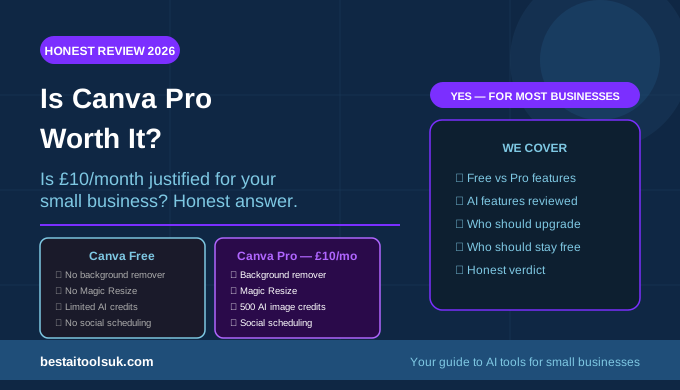
The honest answer is yes for most small businesses that produce visual content regularly — the AI features alone, particularly the background remover and Magic Resize, save more time per month than the subscription costs. The honest caveat is that for businesses that use Canva occasionally rather than regularly, the free plan is sufficient and the Pro upgrade is not worth the cost. This guide tells you exactly which features justify the upgrade and which business situations suit each plan. For the broader context of AI design tools available to small businesses, see our Canva AI review for the complete breakdown of all features across both plans.
Canva Free vs Canva Pro: What You Actually Get
| Feature | Canva Free | Canva Pro |
| Templates | 250,000+ | 420,000+ |
| Storage | 5GB | 1TB |
| Brand Kit | 1 kit | Unlimited kits |
| Background Remover | No | ✓ Unlimited |
| Magic Resize | No | ✓ One-click resize |
| AI Image Generation | Limited credits | 500 credits/month |
| Magic Write (AI copy) | 25 uses | Unlimited |
| Magic Edit | No | ✓ Included |
| Schedule social media | No | ✓ 8 platforms |
| Price | Free | ~£10/month |
The Canva Pro Features That Justify the Upgrade
Background Remover
The Background Remover is the single feature that most Canva Pro subscribers cite as their primary reason for upgrading — and it is easy to understand why. Removing the background from a product photo, a headshot, or any image that you want to use on a coloured or branded background previously required either Photoshop skills, a separate tool, or paying a designer. Canva Pro’s Background Remover does it in one click, instantly, with results that are accurate enough for most business use cases. For small businesses that sell physical products and need clean product images for their website and social media, this feature alone saves significant time and cost every month.
Magic Resize
Magic Resize allows you to resize any design for different platforms with a single click — taking an Instagram square post and instantly creating a landscape Facebook version, a vertical story, a Twitter post, and a LinkedIn banner from the same design. Without Pro, resizing for different platforms means recreating each size from scratch. With Pro, it takes thirty seconds. For small businesses managing social media across multiple platforms, this feature eliminates one of the most repetitive and time-consuming design tasks in the workflow. See our guide to the best AI social media tools for small businesses for how Magic Resize fits into a broader social media content workflow.
Brand Kit
The Brand Kit allows you to store your business colours, fonts, and logos in Canva and apply them to any design with a single click — ensuring every piece of content you produce is on-brand without manually entering hex codes or uploading logo files each time. For small businesses that produce regular content across multiple formats, Brand Kit is the feature that transforms Canva from a general design tool into a branded content production system. The free plan allows one brand kit — sufficient for most solo businesses — while Pro allows unlimited kits, which is valuable for businesses managing multiple brands or client accounts.
AI Features — Magic Write, Image Generation and Magic Edit
Canva Pro unlocks the full suite of AI features that make content production significantly faster. Magic Write — Canva’s AI copywriting tool — provides unlimited uses on Pro versus twenty-five on the free plan, allowing you to generate social media captions, headings, and short copy directly within your designs without switching to a separate writing tool. The AI image generation allowance increases to five hundred credits per month on Pro. Magic Edit — which allows you to modify specific parts of an image by describing what you want to change — is a Pro-exclusive feature. For businesses that use these AI features regularly, the Pro plan pays for itself in time saved on content production. See our Canva AI review for the complete breakdown of each AI feature and where it delivers the most value.
Social Media Scheduling
Canva Pro includes a built-in social media scheduling tool that allows you to publish content directly to eight social media platforms — Instagram, Facebook, Twitter, LinkedIn, Pinterest, and others — from within Canva itself. For small businesses that are already using Canva to create their social media graphics, the ability to schedule and publish without switching to a separate tool like Buffer is a genuine workflow improvement. For businesses that need more sophisticated scheduling analytics or manage a high volume of accounts, a dedicated tool like Buffer remains stronger — but for basic scheduling needs, the Canva Pro scheduler removes the need for a separate subscription. See our guide to the best AI social media tools for small businesses for how the scheduling feature compares to dedicated alternatives.
Who Should Upgrade to Canva Pro
Canva Pro is worth the investment for small businesses that use Canva at least three to four times per week for social media content, marketing materials, or any regular visual content production. It is worth it for businesses that sell physical products and need clean product images with backgrounds removed. It is worth it for businesses managing a consistent brand identity across multiple content types and channels. And it is worth it for businesses that currently use a separate background removal tool, image resizing service, or social media scheduler — because Pro potentially replaces several separate subscriptions at a lower combined cost.
Who Should Stay on Canva Free
The free plan is sufficient for businesses that use Canva occasionally rather than regularly — producing a design once or twice per month rather than multiple times per week. It is sufficient for businesses whose visual content needs are simple and don’t require the background remover or cross-platform resizing. And it is sufficient for businesses just starting out that want to test Canva’s capabilities before committing to a paid subscription. The free plan is genuinely capable — it is not a deliberately crippled version designed to force upgrades. See our comparison of Canva AI vs Adobe Firefly if you are deciding between Canva Pro and Adobe’s alternative for AI image generation specifically.
Is Canva Pro Worth It for Specific Business Types?
Product-Based Businesses
Yes — unambiguously. The Background Remover alone saves product-based businesses significant time and potentially the cost of a photographer or editor for clean product shots. Combined with Magic Resize for adapting product images across different platform formats, Canva Pro delivers clear, measurable value for any business selling physical products.
Service-Based Businesses and Consultants
Yes for most. Service businesses that use social media for client acquisition — consultants, coaches, freelancers, professional services — benefit significantly from Brand Kit consistency and Magic Resize for maintaining a professional presence across platforms. The AI writing features reduce the time spent on caption production. At ten pounds per month, the upgrade pays for itself in a few hours of saved design time.
Businesses That Rarely Post on Social Media
Probably not. If you post once or twice per month and your design needs are minimal, the free plan covers your requirements and the Pro upgrade is difficult to justify. Consider whether your design activity is low because you don’t need much visual content, or because creating it takes too long — if it’s the latter, Pro might actually increase your posting frequency by reducing the time barrier.
The Honest Verdict
Canva Pro is worth it for most small businesses that produce visual content regularly. At approximately ten pounds per month, the Background Remover, Magic Resize, Brand Kit, and AI features collectively save more time than the subscription costs for businesses using Canva three or more times per week. The 30-day free trial is the most important data point — if you use the Pro features actively during the trial and find they improve your content production workflow, the upgrade pays for itself. If you find you’re not using the Pro features, cancel before the trial ends and stay on the free plan.
The businesses that regret upgrading to Pro are those that upgrade out of aspiration rather than necessity — paying for features they intend to use rather than features they actually use. Be honest about your current Canva usage before upgrading. If you’re producing visual content regularly and hitting the free plan’s limitations, Pro is an easy yes. Try Canva Pro here with the 30-day free trial and make the decision based on your actual usage rather than speculation.
⭐ Try Canva Pro free for 30 days and decide for yourself: Try Canva Pro here
Published on bestaitoolsuk.com — Your trusted guide to AI tools for small businesses