Canva AI vs Adobe Firefly: Which Is Better for Small Businesses in 2026?
A direct comparison of the two most accessible AI image tools — so you can choose the right one for your design workflow and budget
This article contains affiliate links. If you purchase through these links, we may earn a commission at no extra cost to you. This does not affect our assessment — we only recommend tools we genuinely believe deliver value.
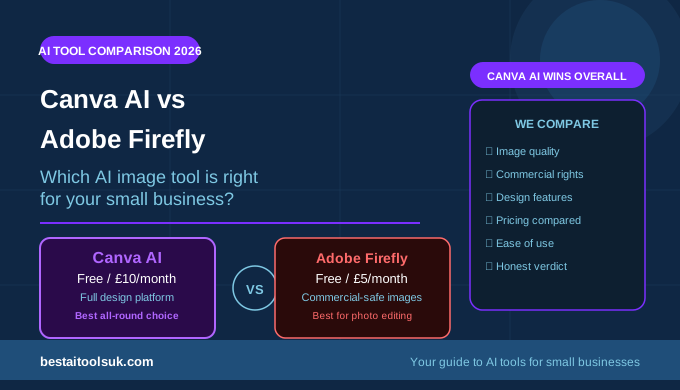
Canva AI vs Adobe Firefly is the comparison that most small business owners arrive at when they start exploring AI image generation seriously. Both tools are accessible, both produce commercially usable images, and both are backed by established companies with strong reputations. But they are built around different core value propositions — Canva AI is a comprehensive design platform that includes AI image generation as one of many features, while Adobe Firefly is primarily an AI image generation and editing tool that prioritises commercial safety and photographic quality above all else. Choosing between them depends on what you actually need from an AI image tool.
The short answer is that Canva AI is the stronger choice for most small businesses — the combination of design platform, image generation, and brand management tools at ten pounds per month covers more of what small businesses need in a single subscription than Adobe Firefly at five pounds per month. Adobe Firefly is the stronger choice for businesses that specifically need the highest commercial rights clarity and the most photorealistic image editing capability. For the full context of AI image tools available to small businesses, see our guide to the best AI image generators for small businesses.
Canva AI vs Adobe Firefly: Quick Comparison
| Feature | Canva AI | Adobe Firefly |
| Starting price | Free / £10/month | Free credits / £5/month |
| Image generation | ✓ Text to Image | ✓ Text to Image |
| Image editing | ✓ Magic Edit, Expand | ✓ Generative Fill |
| Background removal | ✓ Instant | ✓ Available |
| Design platform | ✓ Full platform included | Standalone / Creative Cloud |
| Commercial rights | ✓ All paid plans | ✓ Full commercial rights |
| Copyright safety | Good | ✓ Best in class |
| Templates | ✓ Thousands included | Limited |
| Brand kit | ✓ Pro feature | No |
| Best for | All-round design + images | Commercial-safe images |
What Is Canva AI?
Canva AI is the suite of AI-powered features built into Canva’s comprehensive design platform. The core AI features include Text to Image for generating images from descriptions, Magic Edit for modifying specific parts of existing images, Magic Expand for extending images beyond their original boundaries, Background Remover for instant subject isolation, and Magic Write for generating copy directly within the design editor. These AI tools work alongside Canva’s full design platform — templates, drag-and-drop editor, Brand Kit, and content library — making Canva AI a complete visual content creation solution rather than a standalone image generator. See our Canva AI review for the complete breakdown of all AI features across the platform.
What Is Adobe Firefly?
Adobe Firefly is Adobe’s family of AI image generation and editing models, available as a standalone web application and integrated into Adobe Creative Cloud products. The core Firefly capabilities include Text to Image for generating images from text descriptions, Generative Fill for adding, removing, or replacing elements within existing photographs, Text Effects for applying AI-generated styles to text, and Generative Expand for extending images beyond their original boundaries. The defining characteristic of Adobe Firefly — the feature that most distinguishes it from other AI image tools — is that it is trained exclusively on Adobe Stock images, openly licensed content, and public domain material, making it the most commercially safe AI image generator available.
Canva AI vs Adobe Firefly: Head-to-Head
Image Generation Quality
Both tools produce high-quality images from text descriptions, but they excel in different styles. Adobe Firefly produces more photorealistic images — particularly strong for generating realistic photography-style visuals of products, people, and environments. Canva AI’s image generation is stronger for illustrative, graphic, and stylised content — the kind of visual that works well for social media, marketing materials, and blog posts. For businesses that primarily need photorealistic product or lifestyle photography alternatives, Firefly has an edge. For businesses that need varied visual content across different styles, Canva AI’s broader style range is more versatile.
Verdict: Adobe Firefly wins on photorealism. Canva AI wins on style versatility.
Image Editing Capabilities
Both tools include AI-powered image editing features, but they approach editing differently. Adobe Firefly’s Generative Fill is one of the most powerful AI photo editing features available — allowing you to select any area of a photograph and describe what you want to replace it with, producing seamlessly integrated results that are difficult to distinguish from the original photograph. This is particularly powerful for editing product photography, adding or removing background elements, and adapting existing images for different contexts. Canva AI’s Magic Edit performs a similar function but with less precision and consistency than Firefly’s Generative Fill.
Verdict: Adobe Firefly wins on image editing. Generative Fill is significantly more powerful than Canva’s Magic Edit.
Commercial Rights and Copyright Safety
This is Adobe Firefly’s most distinctive advantage. Because Firefly is trained exclusively on Adobe Stock images, openly licensed content, and public domain material, Adobe provides an explicit commercial use guarantee — images generated with Firefly are cleared for use in advertising, on product packaging, and in any commercial context without copyright risk. Canva AI’s images are commercially usable on paid plans, but the training data for Canva’s image generation models is less transparently documented than Adobe Firefly’s. For businesses in regulated industries, those using AI images in advertising campaigns, or those with legal sensitivity around intellectual property, Firefly’s copyright safety is a meaningful advantage.
Verdict: Adobe Firefly wins on copyright safety. It’s the most commercially secure AI image generator available.
Design Platform and Templates
This is Canva AI’s most significant advantage over Adobe Firefly. Canva is a comprehensive design platform with thousands of templates covering every format a small business needs — social media posts, presentations, flyers, business cards, email headers, and more. The drag-and-drop editor, Brand Kit, and content library make it possible to produce complete, professional marketing materials within a single tool. Adobe Firefly is primarily an image generation and editing tool — it does not include a design platform, template library, or brand management features. Businesses that need Firefly’s images in designed layouts need to use a separate design tool, or use Firefly as part of an Adobe Creative Cloud subscription. See our guide to the best AI social media tools for small businesses for how Canva fits into a broader social media workflow.
Verdict: Canva AI wins significantly on design platform. Adobe Firefly has no design or template features.
Pricing and Value
Adobe Firefly is available with free monthly generation credits, with the Firefly plan at approximately five pounds per month providing more credits and full commercial rights. Canva Pro at approximately ten pounds per month includes the full Canva AI feature set alongside the complete design platform — templates, Brand Kit, unlimited storage, and more. On a pure image generation basis, Adobe Firefly offers more generation credits per pound. On an overall value basis for small businesses that need both image generation and design tools, Canva Pro is significantly more cost-effective than paying for Canva Pro plus a separate Firefly subscription.
Verdict: Adobe Firefly wins on pure image generation value. Canva AI wins on overall value for businesses that need design tools too.
Ease of Use
Both tools are accessible for non-designers, but Canva AI has a shallower learning curve for most small business owners. The Canva interface is familiar to millions of users, the AI features are integrated naturally into the existing workflow, and the template starting points reduce the complexity of producing professional-looking content. Adobe Firefly’s web interface is clean and simple, but it requires more skill with prompting to produce reliably useful image generation output than Canva AI’s more constrained generation options.
Verdict: Canva AI wins on ease of use for non-designers.
Who Should Choose Canva AI
Canva AI is the right choice for small businesses that need a comprehensive visual content creation tool — not just image generation but the full design workflow from template selection to final export. It is the right choice if you produce regular social media content, marketing materials, presentations, or any visual content where starting from a template saves significant time. It is the right choice if brand consistency is important and you want a Brand Kit to maintain consistent colours, fonts, and logos across all your content. And it is the right choice if you want the strongest overall value from a single design subscription. Try Canva free here to access the full feature set on the free plan before deciding whether Pro is worth the upgrade.
Who Should Choose Adobe Firefly
Adobe Firefly is the right choice for businesses that specifically need the clearest commercial rights for AI-generated images — particularly those using AI images in advertising, on product packaging, or in any commercially sensitive context. It is the right choice for businesses that already use Adobe Creative Cloud products and want AI image generation integrated into their existing workflow. It is the right choice if photorealistic image editing — specifically the Generative Fill feature for modifying existing photographs — is the primary use case. And it is the right choice for businesses that already have a design tool and only need to add AI image generation capability. Try Adobe Firefly here with the free credits to test the image quality before committing to a paid plan.
Can You Use Both?
Yes — and some businesses do, using Canva AI for design and social media content production and Adobe Firefly for high-quality photorealistic image generation and photo editing. The combined cost at approximately fifteen pounds per month is accessible for businesses that need both capabilities. For most small businesses, however, Canva AI alone covers the most important use cases and the additional cost of Firefly is difficult to justify unless photorealistic image editing or commercial rights clarity is a specific priority. See our guide to the best AI image generators for small businesses for the full range of AI image tools at different price points.
The Honest Verdict
Canva AI is the stronger choice for most small businesses — the combination of image generation, design platform, templates, and brand management tools at ten pounds per month represents better overall value than Adobe Firefly for businesses that need to produce complete marketing materials rather than images alone. Adobe Firefly is the stronger choice for businesses where commercial rights clarity is paramount or where Generative Fill’s photo editing capability is the specific requirement.
Start with Canva AI’s free plan — it includes enough AI image generation capability to evaluate whether the tool works for your visual content needs before committing to Pro. If you find that you specifically need the photorealistic editing capabilities or commercial rights clarity that Firefly provides, add Firefly’s free credits alongside Canva. Try Canva free here and generate your first AI images for social media or your website today.
⭐ Try Canva AI free — the strongest all-round AI design and image tool for small businesses: Try Canva free here⭐ Try Adobe Firefly free — the safest choice for commercial image generation: Try Adobe Firefly here
Published on bestaitoolsuk.com — Your trusted guide to AI tools for small businesses